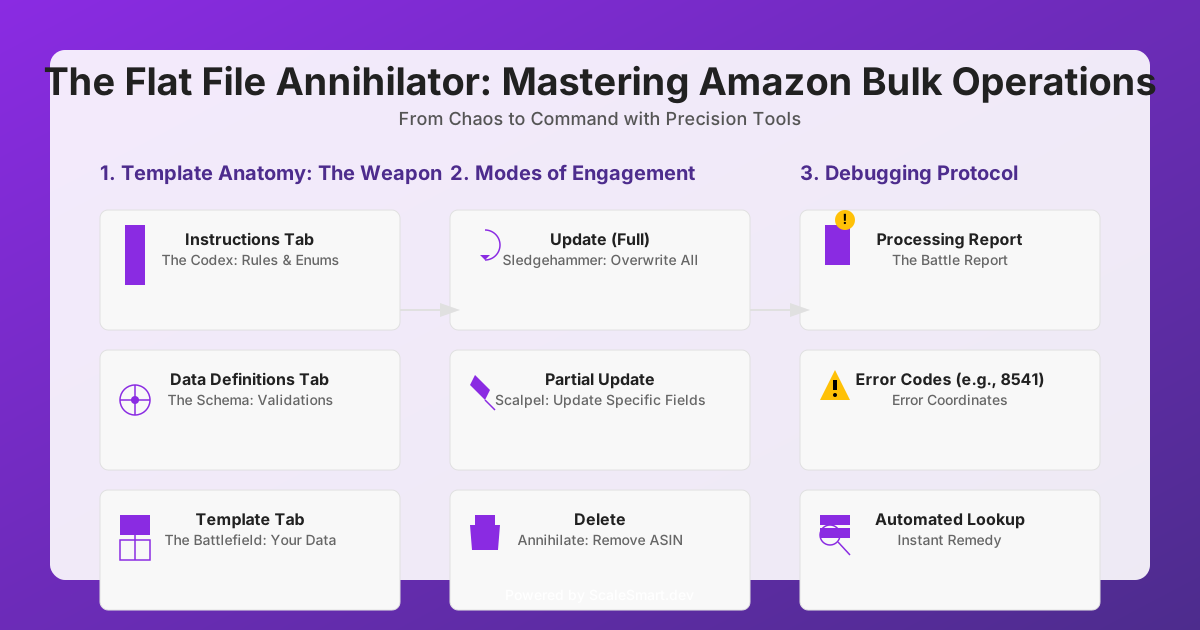
The Flat File Annihilator: Mastering Amazon Bulk Operations
(The Premise) Why This Matters: For the amateur, Amazon Flat Files are a source of terror—a cryptic spreadsheet that promises efficiency but often delivers chaos, suppressed listings, and wasted hours. For the professional, a Flat File is a precision-guided missile for your catalog. It is the most powerful tool for bulk updates, but only if you understand its true nature. This playbook will transform your fear into mastery.
1. The Anatomy of the Weapon: Understanding the Flat File Template
(The Premise) Why This Matters: Every Flat File template is a meticulously structured weapon. Understanding its core components is the first step to wielding it effectively. Ignorance of these fundamentals guarantees frustration and errors.
(The Core Content - The Breakdown) An Amazon Flat File is not just a spreadsheet; it's a multi-tabbed command center.
- The 'Instructions' Tab (The Codex):
- This is not just a
README; it is the sacred scripture for that specific Flat File. It contains crucial definitions, accepted values (enums), and conditional logic for each field. Read it. Every time.
- This is not just a
- The 'Data Definitions' Tab (The Schema):
- This defines every column: its accepted values, max length, and whether it's mandatory. Pay attention to the
Valid Valuescolumn – these are your truth.
- This defines every column: its accepted values, max length, and whether it's mandatory. Pay attention to the
- The 'Template' Tab (The Battlefield):
- This is where you enter your product data. Each row represents an SKU, and each column is an attribute.
- Crucial Distinction: The header row contains three lines:
- The Attribute Name (e.g.,
item_sku). - The Unique Identifier (e.g.,
item-skuorExternal Product ID). This is what Amazon's system reads. - The Accepted Values / Example (e.g.,
skuorExample: X000000000).
- The Attribute Name (e.g.,
The Specialist's Edge (The Unspoken Rule):
Your template is a living document. Never use an old template. Always download the freshest version directly from Seller Central before every single upload. Amazon's schemas can change without warning. An outdated template is a guaranteed error, no matter how perfect your data is. Assume every template you downloaded yesterday is already obsolete.
2. Modes of Engagement: Operations with Flat Files
(The Premise) Why This Matters: A Flat File isn't just for creating new listings. It's for command and control over your entire catalog. Understanding the different update_delete options is critical for precision strikes.
(The Core Content - The Update Types)
| **`update_delete` Value** | **Function**                                                                                                            | **Use Case**                                                                 |
| :------------------------ | :---------------------------------------------------------------------------------------------------------------------- | :--------------------------------------------------------------------------- |
| **`Update` (Full)**         | Overwrites all existing data for the specified ASIN, even if fields are left blank. This is a full re-declaration.       | Complete product overhaul, correcting multiple errors, re-listing after removal. |
| **`PartialUpdate`**       | **Updates only the fields you provide data for.** All other existing data for the ASIN remains untouched.                 | The most common and safest operation. Updating price, quantity, a single bullet point. |
| **`Delete`**              | Completely removes the ASIN and all associated data from your inventory and catalog.                                    | Permanently delisting a product.                                             |
The Specialist's Edge (The Unspoken Rule):
Always prefer
PartialUpdateunless you explicitly intend to overwrite the entire listing.PartialUpdateis your precision scalpel;Update(Full) is a sledgehammer. The vast majority of day-to-day operations can and should be done withPartialUpdate. This minimizes risk and prevents accidental deletion of existing, correct data.
3. The Debugging Protocol: Taming the Processing Report
(The Premise) Why This Matters: The Amazon Processing Report is not just an error log; it is your battle report. It contains the exact coordinates of every failure. The ability to read and interpret these reports is the difference between hours of frustration and minutes of targeted correction.
(The Core Content - Error Interpretation) Common Error Codes and their immediate remedies:
- Error 8541/8573 (Matching Error): Your product data (UPC/EAN, Brand, MPN) doesn't match an existing ASIN.
- Remedy: Verify your product ID and brand data. Ensure the correct
external_product_id_typeis used. This is a crucial validation point before upload.
- Remedy: Verify your product ID and brand data. Ensure the correct
- Error 2000 (Missing Required Field): You left a mandatory field blank.
- Remedy: Refer to the 'Data Definitions' tab. Fill in the missing information.
- Error 90000-series (Invalid Value): You entered a value not allowed for that field (e.g., "red" instead of "Red").
- Remedy: Consult the 'Valid Values' list in the 'Data Definitions' or 'Instructions' tab for the exact, case-sensitive accepted value.
The Specialist's Edge (The Unspoken Rule):
Don't manually copy-paste error messages. After every upload, download the Processing Report and, if you have a custom system, automatically parse the
Error Codecolumn. The pattern of error codes is your diagnostic signature. Build a simple lookup table that maps common error codes to their specific remedies. This turns a manual troubleshooting nightmare into an automated, one-click solution. This is how you reclaim hours of your life.
Conclusion: From Chaos to Command
Stop viewing Amazon Flat Files as a necessary evil. Master them. Understand their structure, wield their operations with precision, and interpret their feedback with ruthless efficiency. By transforming Flat Files from a source of chaos into a tool of command, you are not just managing your catalog; you are asserting dominance over your entire Amazon operation.